
AI Tutorials
n8n Tutorial: The Complete Guide to AI Workflow Automation
A comprehensive tutorial on building powerful AI agents and automating enterprise processes with n8n, the flexible node-based automation platform.
Read MoreRun n8n on an Iranian server with Docker Compose, PostgreSQL, and HTTPS: domestic image mirrors, backups, upgrades, queue mode, local Ollama models, and Jalali dates.
This guide is for developers, IT teams, and workflow builders who want to run n8n on a virtual or on-premises server inside Iran rather than on n8n Cloud. The result is a production installation you can maintain, not a demo: n8n on PostgreSQL, a separate task runner for code execution, HTTPS through Caddy, pinned versions, restorable backups, and a path to local AI models. Persian-speaking searchers often call this "n8n hosting" or "Iranian n8n"; in practice it means the official n8n software on infrastructure that is reachable from inside Iran and under your own control.
The guide was reviewed on September 24, 2026 (2 Mehr 1405) against official documentation from n8n, Docker, Caddy, and Ollama, and against the documentation of Iranian cloud providers. On that date the stable n8n release was 2.40.6. Commands target Ubuntu 24.04. Wherever the text says "our recommendation," it describes our engineering practice rather than a product default. The guide contains no instructions for getting around foreign services' regional restrictions; it relies on domestic mirrors, self-hosting, and models that run on your own server.
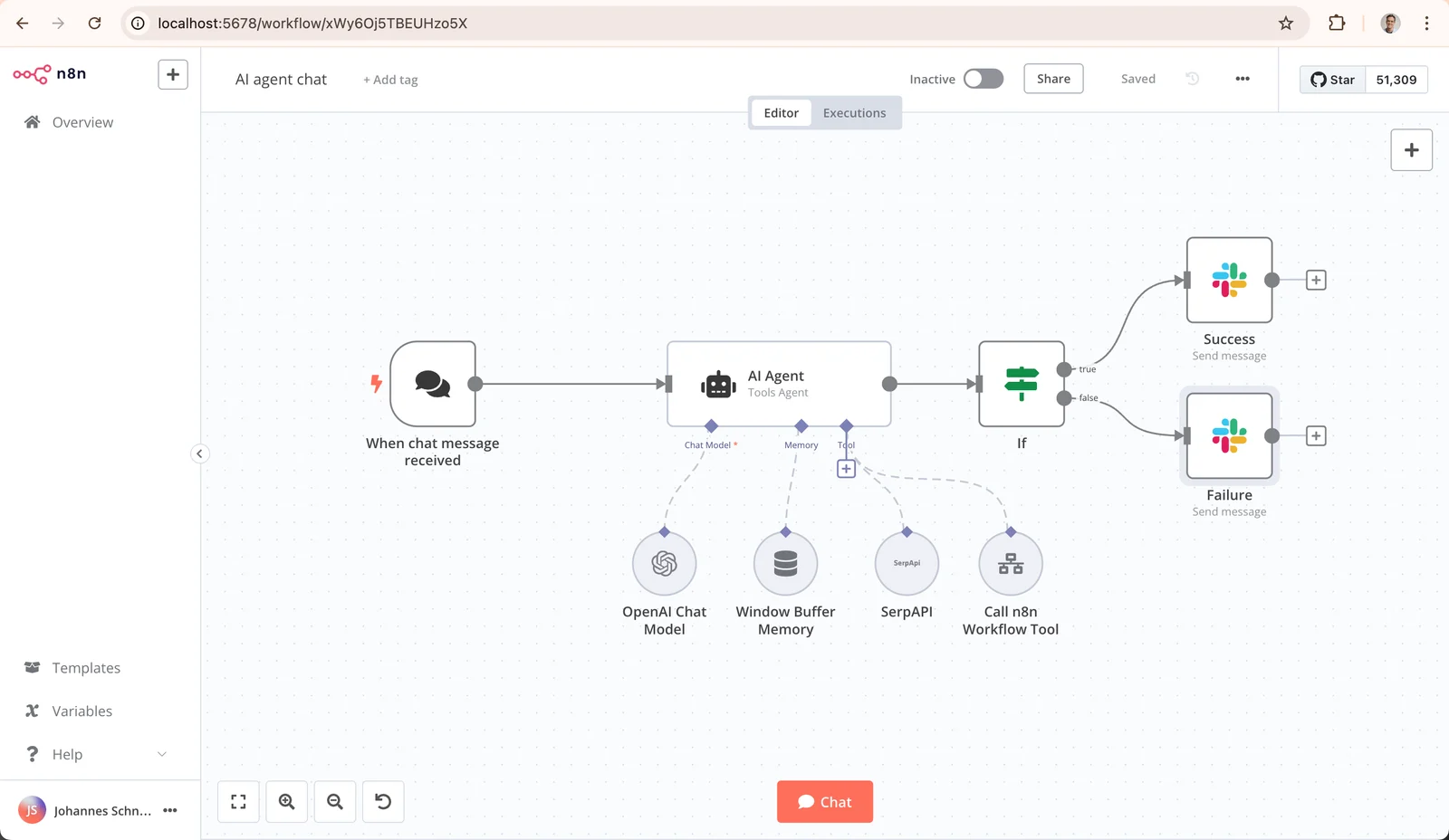
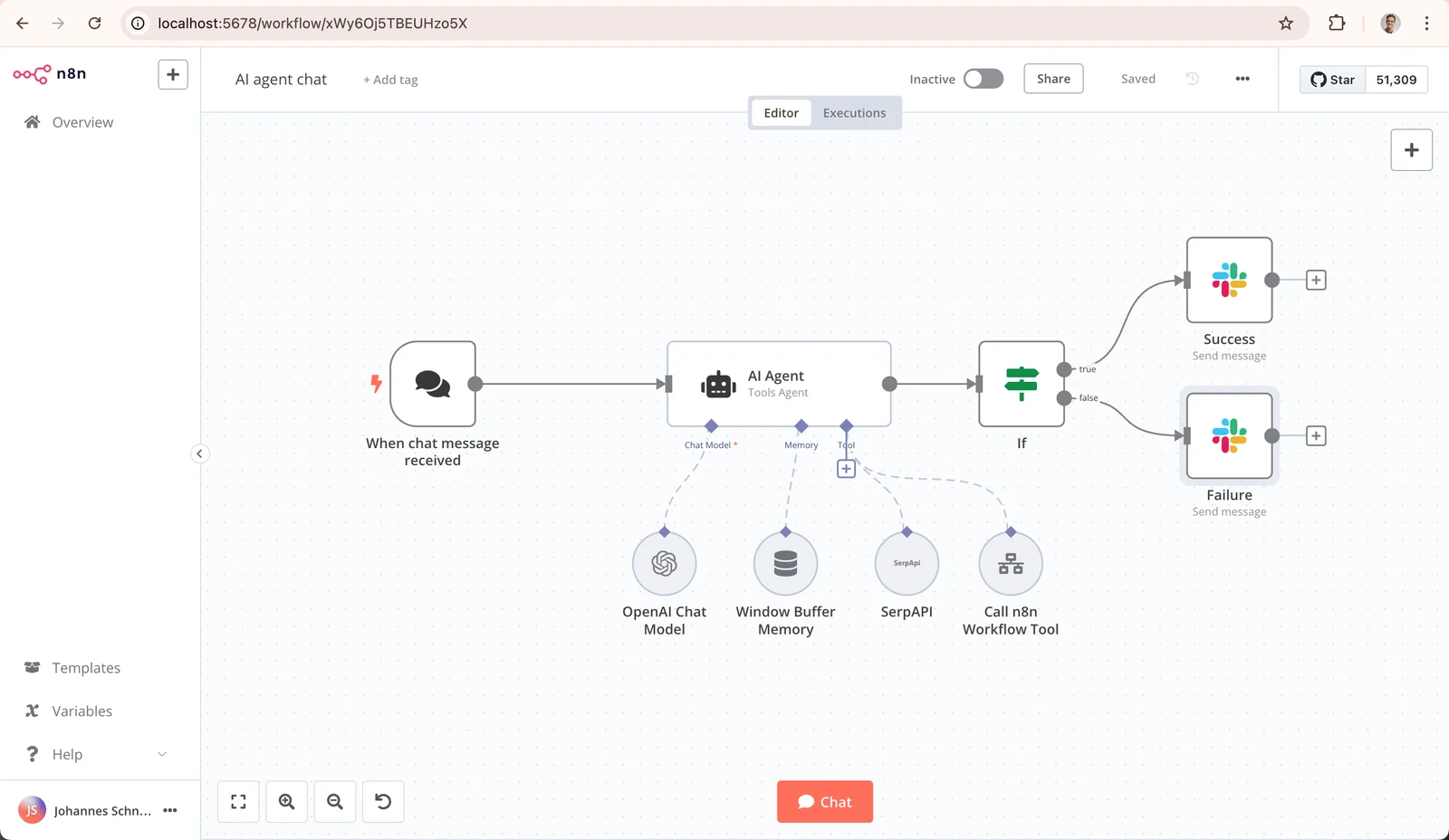 Official n8n screenshot of the workflow editor with an AI Agent node; source: the official n8n GitHub repository
If nodes, triggers, data contracts, and retries are still new to you, read our n8n tutorial on designing production workflows first. This article covers building and operating the server, and leaves workflow design to that guide.
Self-hosted n8n ships under the Sustainable Use License, which n8n calls its Community license. According to the n8n license FAQ, you may use it internally to run your business, run several instances, use it behind the scenes in your own product, and charge for consulting and training. You may not host n8n as a service where your clients build their own workflows, and you may not white-label it.
That distinction matters in the Iranian market. A company installing n8n for its own teams is fine. A provider selling "n8n hosting" that hands each customer a full workflow editor should talk to n8n about a commercial agreement before launch. This is our reading of the license text, not legal advice.
The official Docker Compose installation guide states plainly that self-hosting requires knowledge of server setup, resource management, and security, and that mistakes can cause data loss and downtime. So this guide assumes you are comfortable on a Linux command line, own a domain, and accept that backups and upgrades are now your job.
There are three common paths, each with a different operational cost:
| Path | Fits | Key consideration |
|---|---|---|
| VPS in an Iranian data center | A team that wants full control | Everything from the OS to backups is yours |
| Cloud container with a ready-made app | Quick trials or teams without a server admin | Less control over configuration, backups, and scaling |
| Server inside the corporate network | Sensitive data and internal systems | External webhooks need a public ingress path |
For the second path, ArvanCloud documents a ready-made n8n app on its cloud container platform that deploys in one click and is served on a free Arvan domain or your own. It is a reasonable place to start, but before you move important workflows there, ask where database backups and the encryption key live and whether you can set environment variables yourself. The rest of this guide follows the first path.
Server size, our recommendation: for n8n, PostgreSQL, and Caddy serving a small team, 2 vCPUs, 4 GB of RAM, and 40 GB of SSD is a sensible starting point. If a local language model will run on the same host, budget memory separately: a 7-billion-parameter model quantized to 4 bits is a file of roughly 4 to 5 GB and needs free RAM beyond the file size.
National-internet realities: before you buy, or at least before you accept the server, test what it can reach. Docker Hub, GitHub, the npm and PyPI registries, and many foreign APIs can be slow, unstable, or unreachable from an Iranian server. In the other direction, a webhook that a foreign service must deliver to your server may never arrive during an international connectivity disruption. A few quick checks from the server itself:
curl -sI https://docker-mirror.liara.ir/v2/ | head -n 1
curl -sI https://registry-1.docker.io/v2/ | head -n 1
curl -sI https://api.github.com | head -n 1
getent hosts n8n.example.ir
Our design rule: every external dependency of a workflow is domestic, runs on your own server, or has a fallback, such as queueing the work and retrying once the link is back. Treat the international internet as an unreliable dependency, not a default assumption.
For access, create a dedicated subdomain such as n8n.example.ir and point its A record at the server. The n8n deployment variables reference warns that serving n8n under a sub-path behind a reverse proxy can break folder navigation; a subdomain is simpler.
If your server can reach download.docker.com, follow Docker's official Ubuntu installation guide. If it cannot, the docker.io and docker-compose-v2 packages that Ubuntu itself publishes in the universe archive are a dependable alternative, and domestic Ubuntu mirrors carry them. At review time, the Ubuntu 24.04 update pocket offered Docker 29.1.3 and Compose 2.40.3. Docker's documentation calls these distribution packages unofficial and says they conflict with Docker CE, so pick one path and do not mix them.
Liara publishes an Ubuntu mirror guide using the newer deb822 source format. The version below applies the same configuration in one step and backs up the current file first:
sudo cp /etc/apt/sources.list.d/ubuntu.sources /etc/apt/sources.list.d/ubuntu.sources.bak
sudo tee /etc/apt/sources.list.d/ubuntu.sources > /dev/null <<'EOF'
Types: deb
URIs: https://linux-mirror.liara.ir/repository/ubuntu
Suites: noble noble-updates noble-backports
Components: main restricted universe multiverse
Signed-By: /usr/share/keyrings/ubuntu-archive-keyring.gpg

Types: deb
URIs: https://linux-mirror.liara.ir/repository/ubuntu-security
Suites: noble-security
Components: main restricted universe multiverse
Signed-By: /usr/share/keyrings/ubuntu-archive-keyring.gpg
EOF
sudo apt update
sudo apt install -y docker.io docker-compose-v2
sudo systemctl enable --now docker
docker --version
docker compose version
Many Iranian VPS providers ship images that already point apt at their own mirror. If apt update works without errors, leave it alone. On Ubuntu 26.04 the release name in the Suites line changes; replace it with your system's codename.
To run Docker without sudo, add your user with sudo usermod -aG docker $USER and log out and back in. Membership in the docker group is effectively root access, so grant it only to server administrators.
Docker Hub is often slow or unreachable from servers in Iran. Several domestic providers run public pull-through caches of Docker Hub. Liara's Docker Hub mirror documentation gives the address docker-mirror.liara.ir. In our check on September 24, 2026, docker.iranserver.com (Iran Server) and docker.arvancloud.ir (ArvanCloud) also answered the registry API and served n8nio/n8n:2.40.6, n8nio/runners:2.40.6, postgres:18, caddy:2, and ollama/ollama.
One technical detail explains many failed installs. According to Docker's registry mirror documentation, the registry-mirrors setting only applies to Docker Hub; no other registry is mirrored. Some official n8n examples use docker.n8n.io/n8nio/n8n, which is a separate registry, so the mirror never applies to it. This guide uses the Docker Hub name n8nio/n8n everywhere.
sudo mkdir -p /etc/docker
[ -f /etc/docker/daemon.json ] && sudo cp /etc/docker/daemon.json /etc/docker/daemon.json.bak
sudo tee /etc/docker/daemon.json > /dev/null <<'EOF'
{
  "registry-mirrors": [
    "https://docker-mirror.liara.ir",
    "https://docker.iranserver.com",
    "https://docker.arvancloud.ir"
  ],
  "log-driver": "json-file",
  "log-opts": { "max-size": "10m", "max-file": "3" }
}
EOF
sudo systemctl restart docker
docker info | grep -A4 "Registry Mirrors"
docker pull n8nio/n8n:2.40.6
docker image inspect --format '{{index .RepoDigests 0}}' n8nio/n8n:2.40.6
The last two keys in that file rotate container logs so they cannot fill the disk. A mirror is a third party in your software supply chain, so pin versions and record the image digest. In our check, all three mirrors returned the same index digest for n8nio/n8n:2.40.6 as Docker Hub itself:
sha256:9c7871d5cc4fc2565bb905e4df5bf7d6a5a4bf2f4313fb99a2b3fa380f331d7c
If the output of the last command differs, find out why before you continue. For servers that can reach no registry at all, save the image to a file on another server in your organization with docker save, load it on the target with docker load, and check the digest again.
Our suggested layout is a single directory at /opt/n8n that keeps configuration, shared files, and backups together:
sudo mkdir -p /opt/n8n/local-files /opt/n8n/backups /opt/n8n/models
sudo chown -R "$USER":"$USER" /opt/n8n
sudo chown 1000:1000 /opt/n8n/local-files
cd /opt/n8n
The n8n container runs as user ID 1000, which is why local-files belongs to that ID. Now generate the .env file with random secrets. Hex strings avoid quoting problems with special characters:
cat > .env <<EOF
N8N_VERSION=2.40.6
N8N_DOMAIN=n8n.example.ir
POSTGRES_USER=pgadmin
POSTGRES_PASSWORD=$(openssl rand -hex 24)
POSTGRES_DB=n8n
POSTGRES_NON_ROOT_USER=n8n
POSTGRES_NON_ROOT_PASSWORD=$(openssl rand -hex 24)
N8N_ENCRYPTION_KEY=$(openssl rand -hex 32)
N8N_RUNNERS_AUTH_TOKEN=$(openssl rand -hex 32)
EOF
chmod 600 .env
N8N_ENCRYPTION_KEY is the most important secret in this installation. n8n uses it to encrypt credentials before writing them to the database. Lose it and a database backup can no longer give you your credentials back. Keep a copy of .env off the server, in your organization's password vault.
The script below is the official example from the n8n-hosting repository; it creates a non-superuser PostgreSQL account for n8n. Save it as init-data.sh:
#!/bin/bash
set -e;

if [ -n "${POSTGRES_NON_ROOT_USER:-}" ] && [ -n "${POSTGRES_NON_ROOT_PASSWORD:-}" ]; then
	psql -v ON_ERROR_STOP=1 --username "$POSTGRES_USER" --dbname "$POSTGRES_DB" <<-EOSQL
		CREATE USER ${POSTGRES_NON_ROOT_USER} WITH PASSWORD '${POSTGRES_NON_ROOT_PASSWORD}';
		GRANT ALL PRIVILEGES ON DATABASE ${POSTGRES_DB} TO ${POSTGRES_NON_ROOT_USER};
		GRANT CREATE ON SCHEMA public TO ${POSTGRES_NON_ROOT_USER};
	EOSQL
else
	echo "SETUP INFO: No Environment variables given!"
fi
And this is compose.yaml:
name: n8n

x-n8n-env: &n8n-env
  DB_TYPE: postgresdb
  DB_POSTGRESDB_HOST: postgres
  DB_POSTGRESDB_PORT: "5432"
  DB_POSTGRESDB_DATABASE: ${POSTGRES_DB}
  DB_POSTGRESDB_USER: ${POSTGRES_NON_ROOT_USER}
  DB_POSTGRESDB_PASSWORD: ${POSTGRES_NON_ROOT_PASSWORD}
  N8N_ENCRYPTION_KEY: ${N8N_ENCRYPTION_KEY}
  N8N_HOST: ${N8N_DOMAIN}
  N8N_PORT: "5678"
  N8N_PROTOCOL: https
  N8N_EDITOR_BASE_URL: https://${N8N_DOMAIN}/
  N8N_WEBHOOK_URL: https://${N8N_DOMAIN}/
  N8N_PROXY_HOPS: "1"
  GENERIC_TIMEZONE: Asia/Tehran
  TZ: Asia/Tehran
  NODE_ENV: production
  N8N_ENFORCE_SETTINGS_FILE_PERMISSIONS: "true"
  N8N_RUNNERS_MODE: external
  N8N_RUNNERS_AUTH_TOKEN: ${N8N_RUNNERS_AUTH_TOKEN}
  N8N_RUNNERS_BROKER_LISTEN_ADDRESS: 0.0.0.0
  N8N_BLOCK_ENV_ACCESS_IN_NODE: "true"
  N8N_RESTRICT_FILE_ACCESS_TO: /files
  N8N_DIAGNOSTICS_ENABLED: "false"
  N8N_VERSION_NOTIFICATIONS_ENABLED: "false"
  N8N_TEMPLATES_ENABLED: "false"

services:
  postgres:
    image: postgres:18
    restart: unless-stopped
    environment:
      POSTGRES_USER: ${POSTGRES_USER}
      POSTGRES_PASSWORD: ${POSTGRES_PASSWORD}
      POSTGRES_DB: ${POSTGRES_DB}
      POSTGRES_NON_ROOT_USER: ${POSTGRES_NON_ROOT_USER}
      POSTGRES_NON_ROOT_PASSWORD: ${POSTGRES_NON_ROOT_PASSWORD}
      # Postgres 18 moved its default data directory; keep this line.
      PGDATA: /var/lib/postgresql/data
    volumes:
      - db_data:/var/lib/postgresql/data
      - ./init-data.sh:/docker-entrypoint-initdb.d/init-data.sh:ro
    healthcheck:
      test: ["CMD-SHELL", "pg_isready -h localhost -U ${POSTGRES_USER} -d ${POSTGRES_DB}"]
      interval: 5s
      timeout: 5s
      retries: 10

  n8n:
    image: n8nio/n8n:${N8N_VERSION}
    restart: unless-stopped
    environment:
      <<: *n8n-env
    volumes:
      - n8n_data:/home/node/.n8n
      - ./local-files:/files
    depends_on:
      postgres:
        condition: service_healthy

  n8n-runner:
    image: n8nio/runners:${N8N_VERSION}
    restart: unless-stopped
    environment:
      N8N_RUNNERS_AUTH_TOKEN: ${N8N_RUNNERS_AUTH_TOKEN}
      N8N_RUNNERS_TASK_BROKER_URI: http://n8n:5679
      GENERIC_TIMEZONE: Asia/Tehran
      TZ: Asia/Tehran
    depends_on:
      - n8n

  caddy:
    image: caddy:2
    restart: unless-stopped
    ports:
      - "80:80"
      - "443:443"
    volumes:
      - ./Caddyfile:/etc/caddy/Caddyfile:ro
      - caddy_data:/data
      - caddy_config:/config
    depends_on:
      - n8n

volumes:
  n8n_data:
    name: n8n_data
  db_data:
    name: n8n_db_data
  caddy_data:
    name: n8n_caddy_data
  caddy_config:
    name: n8n_caddy_config
The reasoning behind the decisions that matter most:
PGDATA line: Postgres 18 changed its default data path, and without that line the database appears empty after a restart./home/node/.n8n must persist even with PostgreSQL, because it holds the settings file and the encryption key. Explicit volume names make the backup commands simple and predictable.n8nio/runners container executes Code node JavaScript outside the main process. n8n's own hosting example pins both images to the same version, so here both read N8N_VERSION and always move in lockstep.N8N_HOST, N8N_PROTOCOL, N8N_EDITOR_BASE_URL, and N8N_WEBHOOK_URL tell n8n the address users and services use to reach it. The older WEBHOOK_URL variable has been deprecated since 2.35.0; it still works but logs a warning.GENERIC_TIMEZONE drives schedule-based nodes such as the Schedule Trigger, and TZ sets the container's system clock. Without them, schedules run on New York time.N8N_BLOCK_ENV_ACCESS_IN_NODE as false by default, meaning the Code node and expressions can read environment variables. Here the database password and encryption key live in n8n's environment, so we turn it on.Create a Caddyfile next to compose.yaml and replace the domain and email with your own:
{
	email ops@example.ir
}

n8n.example.ir {
	encode zstd gzip
	reverse_proxy n8n:5678
}
Caddy's reverse_proxy documentation says it sets the X-Forwarded-For, X-Forwarded-Proto, and X-Forwarded-Host headers itself and passes WebSocket connections through. That is exactly what n8n's guide to webhook URLs behind a reverse proxy requires, alongside the N8N_WEBHOOK_URL and N8N_PROXY_HOPS=1 settings already in the Compose file. The WebSocket carries live editor updates; if it is broken, the editor shows a connection-lost message.
Certificates and the international internet. According to Caddy's automatic HTTPS documentation, issuing a certificate from Let's Encrypt or ZeroSSL needs two things: your server must reach the certificate authority, and the authority must reach port 80 or 443 on your server from outside. During an international disruption both can fail, and so can the renewal that runs every few weeks. Three options for that situation:
tls /etc/caddy/certs/fullchain.pem /etc/caddy/certs/privkey.pem. Mount the certificate directory into the Caddy container and monitor the expiry date.tls internal creates a local certificate authority. You then need to install its root certificate on users' devices./data volume. In every case keep the caddy_data volume so certificates and renewal state survive restarts.If your organization prefers Nginx, remove the Caddy service from Compose, add ports: ["127.0.0.1:5678:5678"] to the n8n service, and install Nginx on the host. The Upgrade and Connection headers are essential for the WebSocket:
server {
    listen 443 ssl;
    server_name n8n.example.ir;

    ssl_certificate     /etc/letsencrypt/live/n8n.example.ir/fullchain.pem;
    ssl_certificate_key /etc/letsencrypt/live/n8n.example.ir/privkey.pem;
    client_max_body_size 50m;

    location / {
        proxy_pass http://127.0.0.1:5678;
        proxy_http_version 1.1;
        proxy_set_header Upgrade $http_upgrade;
        proxy_set_header Connection "upgrade";
        proxy_set_header Host $host;
        proxy_set_header X-Forwarded-For $proxy_add_x_forwarded_for;
        proxy_set_header X-Forwarded-Host $host;
        proxy_set_header X-Forwarded-Proto $scheme;
        proxy_buffering off;
    }
}
Obtain the certificate with sudo certbot --nginx -d n8n.example.ir. The same certificate-authority reachability caveat described for Caddy applies here too.
Configure the firewall first. Docker's packet filtering and firewalls documentation explains that traffic to published container ports is diverted before it reaches ufw's rules. In other words, if you publish port 5678, blocking it in ufw does nothing. That is why n8n has no published port in our file.
sudo ufw allow OpenSSH
sudo ufw allow 80,443/tcp
sudo ufw enable

cd /opt/n8n
docker compose config --quiet
docker compose pull
docker compose up -d
docker compose ps
docker compose logs -f n8n
curl -fsS https://n8n.example.ir/healthz
config --quiet catches syntax errors before anything starts. In the n8n log you should see database migrations run and the task runner connect. The healthz endpoint should report status ok.
As soon as the service is up, open the domain in a browser and create the owner account. Until an owner exists, whoever completes the setup screen first becomes the instance owner. Use a strong password and turn on two-factor authentication for this account and every account after it.
n8n's backup and restore guide defines a complete backup as two parts: the .n8n folder, which holds the encryption key, and the PostgreSQL database. The same guide stresses that the CLI export commands cover only workflows and credentials, not users, roles, execution history, variables, or instance settings. CLI exports are good for moving workflows; they do not replace a full backup.
Save this script as /opt/n8n/backup.sh and make it executable with chmod +x:
#!/usr/bin/env bash
set -euo pipefail
cd /opt/n8n
set -a; . ./.env; set +a
STAMP=$(date +%F-%H%M)

docker compose exec -T postgres \
  pg_dump -U "$POSTGRES_USER" -d "$POSTGRES_DB" -Fc > "backups/db-$STAMP.dump"

docker run --rm -v n8n_data:/data:ro -v /opt/n8n/backups:/backup alpine:3.20 \
  tar czf "/backup/n8n-data-$STAMP.tgz" -C /data .

find backups -type f -mtime +14 -delete
For a nightly run, add this line with crontab -e:
15 2 * * * /opt/n8n/backup.sh >> /var/log/n8n-backup.log 2>&1
A backup that lives only on the same server does not help when the disk fails or the server is lost. Copy the files to domestic cloud object storage or another server in your organization, and keep .env separate from the backups. Our recommendation is to rehearse a full restore on a test server every quarter:
docker compose stop n8n n8n-runner
docker compose exec -T postgres \
  pg_restore -U "$POSTGRES_USER" -d "$POSTGRES_DB" --clean --if-exists < backups/db-YYYY-MM-DD-HHMM.dump
docker compose start n8n n8n-runner
Before running these commands, load the .env values into your shell with set -a; . ./.env; set +a and replace the file name with a real backup. A restore only counts as successful when n8n starts with the same encryption key and the credentials work in the editor.
n8n publishes a new release most weeks. The n8n update guide recommends updating at least monthly so you never jump several versions at once, reading the release notes for breaking changes, and testing the upgrade on a separate instance first. Our routine:
cd /opt/n8n
./backup.sh
nano .env    # set N8N_VERSION to the new stable release
docker compose pull n8n n8n-runner
docker compose up -d
docker compose logs -f n8n
A few details matter in practice. Use stable releases for production, not beta. The n8n and task runner versions always move together. n8n runs database migrations on start-up, so rolling back is not just a matter of changing the image tag; a safe rollback means restoring the backup you took right before the upgrade. Pull the new image from the mirror before the maintenance window so a slow network does not extend the downtime.
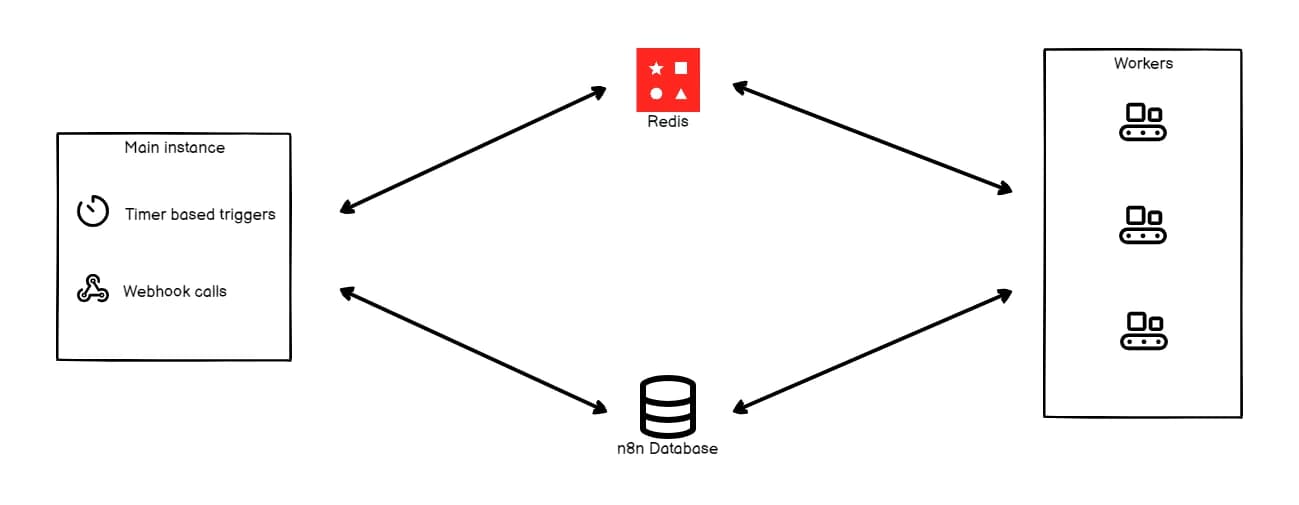 Official n8n diagram of queue mode: the main instance, Redis, workers, and the database; source: n8n documentation
By default a single n8n process serves the editor and executes workflows. The queue mode documentation describes a different architecture: the main instance receives timers and webhooks and places an execution ID in Redis, workers pick it up, run it, and write the result to the database. Every worker needs the same encryption key and the same database, and queue mode on SQLite is not recommended.
To enable it in the same Compose file, add these four lines to the x-n8n-env block:
  EXECUTIONS_MODE: queue
  QUEUE_BULL_REDIS_HOST: redis
  QUEUE_HEALTH_CHECK_ACTIVE: "true"
  OFFLOAD_MANUAL_EXECUTIONS_TO_WORKERS: "true"
Then add these services under services, add redis_data with name: n8n_redis_data to the volumes list, and add redis to the n8n service's depends_on:
  redis:
    image: redis:7-alpine
    restart: unless-stopped
    volumes:
      - redis_data:/data
    healthcheck:
      test: ["CMD", "redis-cli", "ping"]
      interval: 5s
      timeout: 5s
      retries: 10

  n8n-worker:
    image: n8nio/n8n:${N8N_VERSION}
    restart: unless-stopped
    command: worker --concurrency=5
    environment:
      <<: *n8n-env
    volumes:
      - n8n_data:/home/node/.n8n
    depends_on:
      redis:
        condition: service_healthy
      postgres:
        condition: service_healthy

  n8n-worker-runner:
    image: n8nio/runners:${N8N_VERSION}
    restart: unless-stopped
    environment:
      N8N_RUNNERS_AUTH_TOKEN: ${N8N_RUNNERS_AUTH_TOKEN}
      N8N_RUNNERS_TASK_BROKER_URI: http://n8n-worker:5679
      GENERIC_TIMEZONE: Asia/Tehran
      TZ: Asia/Tehran
    depends_on:
      - n8n-worker
Each worker needs its own task runner; the pattern above follows n8n's official example. The n8n documentation recommends a concurrency of 5 or more per worker, because low concurrency across many workers can exhaust the database connection pool. One more limit: queue mode does not support filesystem storage for binary data, so if your workflows move files, check the binary data storage options for your edition before switching.
Our recommendation: measure a single instance before adopting queue mode. The real bottleneck is often a slow API or a third-party rate limit, and more workers only produce more rate-limit errors.
An instance connected to a finance system, a corporate messenger, or a customer database is as sensitive as those systems. Our short list:
NODES_EXCLUDE.2.12.0, N8N_SSRF_PROTECTION_ENABLED=true stops nodes such as HTTP Request from calling internal addresses. The SSRF protection documentation says private network ranges are blocked by default, which is exactly where internal Compose containers live. For permitted internal services, such as Ollama in the next section, also set N8N_SSRF_ALLOWED_HOSTNAMES=ollama. The feature does not replace a firewall, and the documentation itself describes it as an additional layer. For the broader pattern, see network boundaries for URL fetching and SSRF.N8N_PUBLIC_API_DISABLED=true.docker compose exec n8n n8n audit and archive the result..env readable only by the server administrator.Execution data is sensitive as well. By default n8n prunes execution data older than 336 hours and keeps at most 10,000 executions. If your workflows handle personal data, shorten that window to match your organization's retention policy.
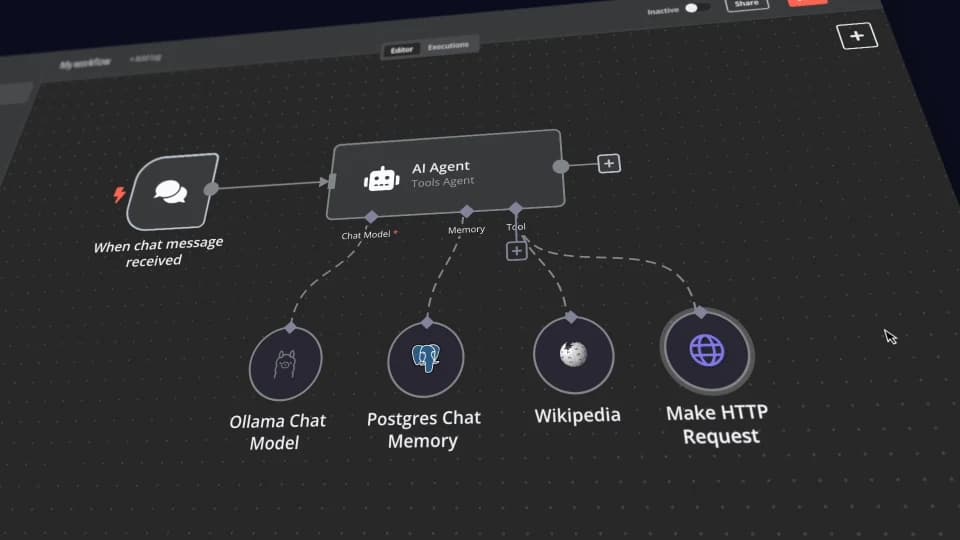 Frame from n8n's official Self-hosted AI Starter Kit video: an AI Agent node wired to the Ollama Chat Model and Postgres Chat Memory; source: the official n8n GitHub repository
n8n's AI nodes need a language model. From an Iranian server, foreign model APIs are usually unreachable, and sending organizational data to them raises its own legal and security questions. That leaves two practical paths: an open model on your own server with Ollama, or the API of a domestic provider.
Local models with Ollama. Add this service to Compose, add ollama_data with name: n8n_ollama_data to the volumes, and pin the image tag to a specific version once you have tested it:
  ollama:
    image: ollama/ollama:latest
    restart: unless-stopped
    volumes:
      - ollama_data:/root/.ollama
      - ./models:/models:ro
In n8n, create an Ollama credential with the base URL http://ollama:11434. The Ollama node common issues page explains that when both run in Docker, localhost inside the n8n container points at n8n itself, so you must use the Ollama container's name.
ollama pull downloads models from Ollama's registry abroad, which may be unreachable. Ollama's model import documentation offers another route: place a GGUF model file obtained from your organization's internal repository or a trusted domestic source in /opt/n8n/models, check the model license and the file checksum, and create a Modelfile next to it:
FROM /models/qwen2.5-7b-instruct-q4_k_m.gguf
PARAMETER temperature 0.2
docker compose exec ollama ollama create qwen-fa -f /models/Modelfile
docker compose exec ollama ollama run qwen-fa "یک جمله کوتاه فارسی درباره پشتیبانگیری بنویس."
Ollama does not quantize a model during import; the file must already be quantized. The file name above is only an example. Open models vary widely in Persian quality, so before choosing one, collect 30 to 50 real samples of your own text with the expected answers and compare several models on the same set. On a CPU without a GPU, small models are suited to classification, field extraction, and short summaries, not long reasoning. For running open models at organizational scale, see our guide to open-source model operations.
A domestic provider's API. Some Iranian providers offer endpoints compatible with OpenAI's API. In n8n, the OpenAI credential has a Base URL field you can point at that provider, and then use the OpenAI Chat Model node. Before connecting, ask exactly which model runs behind the endpoint, on what infrastructure and in which country, how long data is retained, and whether the model's license and its maker's terms permit your use. We recommend open models that the provider runs on its own domestic infrastructure. To compare domestic options, see our guide to Iranian AI platforms.
A small but real workflow: a website contact form sends a Persian message to n8n, n8n normalizes the text, records the receipt time as a Tehran Jalali date, classifies the topic with the local model, and replies. Four nodes:
contact-fa, Header Auth authentication, and the Using Respond to Webhook Node response option.The Code node converts the Arabic characters «ي» and «ك» to the Persian «ی» and «ک», converts Persian and Arabic-Indic digits in the phone number to Latin digits, and keeps the time both as ISO and as a Jalali date:
const toLatinDigits = (value) =>
  String(value ?? '')
    .replace(/[۰-۹]/g, (d) => String('۰۱۲۳۴۵۶۷۸۹'.indexOf(d)))
    .replace(/[٠-٩]/g, (d) => String('٠١٢٣٤٥٦٧٨٩'.indexOf(d)));

const normalizePersian = (value) =>
  String(value ?? '')
    .replace(/ي/g, 'ی')
    .replace(/ك/g, 'ک')
    .replace(/\s+/g, ' ')
    .trim();

return $input.all().map((item) => {
  const body = item.json.body ?? {};
  const receivedAt = DateTime.now().setZone('Asia/Tehran');
  const jalali = receivedAt.reconfigure({ outputCalendar: 'persian' });

  return {
    json: {
      name: normalizePersian(body.name),
      message: normalizePersian(body.message),
      phone: toLatinDigits(body.phone).replace(/\D/g, ''),
      receivedAt: receivedAt.toISO(),
      receivedAtJalali: jalali.toFormat('yyyy/MM/dd HH:mm'),
      receivedAtLabel: jalali.setLocale('fa-IR').toFormat('d MMMM yyyy'),
    },
  };
});
According to n8n's dates and times documentation, n8n uses the Luxon library for dates, and DateTime and $now are available in the Code node and in expressions. We tested this code with Luxon 3: for September 24, 2026, receivedAtJalali began with 1405/07/02 and receivedAtLabel was «۲ مهر ۱۴۰۵». If you only need the date in a Set node or a message body, this expression is enough:
{{ $now.setZone('Asia/Tehran').setLocale('fa').reconfigure({ outputCalendar: 'persian' }).toFormat('yyyy/MM/dd') }}
With setLocale('fa') the output uses Persian digits, as in ۱۴۰۵/۰۷/۰۲; without it, Latin digits. Three rules that save trouble later: always store ISO timestamps in the database and produce Jalali dates only for display; a Jalali string sorts correctly only when month and day are zero-padded; and never strip the zero-width non-joiner that Persian uses inside words. The code above collapses repeated spaces but leaves that character alone.
In the Basic LLM Chain prompt, pass the message with the expression {{ $json.message }} and ask explicitly for exactly one of the four labels. Check the model's output against the label list with an If or Switch node before any further action; anything outside the list should go to a human review queue. Test the workflow like this:
curl -sS -X POST "https://n8n.example.ir/webhook-test/contact-fa" \
  -H "Content-Type: application/json; charset=utf-8" \
  -H "X-Webhook-Token: <your-token>" \
  --data '{"name":"علي رضايي","message":"سلام، فاكتور ۱۲۳ هنوز نرسيده","phone":"۰۹۱۲-۳۴۵-۶۷۸۹"}'
The webhook-test URL only works while the editor is waiting for a test run. After activating the workflow, use the webhook URL. The n8n editor is left-to-right, and Persian text mixed with punctuation sometimes displays out of order there; that is purely a display issue and does not change the data. Wrap HTML output, such as emails or webhook responses, in an element with dir="rtl" and lang="fa", and declare the content type with charset=utf-8.
If you want to take AI automation like this from one test workflow to real processes across several teams, from data contracts to model choice and monitoring, ZharfAI's AI consulting and implementation service is built for that stage.
| Symptom | Likely cause | Fix |
|---|---|---|
docker pull hangs or is refused | No mirror configured, or the image name points at another registry | Check daemon.json and use n8nio/n8n |
Webhook URLs in the editor show localhost:5678 | Public address variables are missing | Check N8N_WEBHOOK_URL, N8N_HOST, and N8N_PROTOCOL |
| The editor reports a lost connection | The WebSocket is not passing through the proxy | Add the Upgrade and Connection headers in Nginx |
| Login fails over plain HTTP | Secure cookies are only sent over HTTPS | Fix the certificate instead of disabling N8N_SECURE_COOKIE |
| Credentials fail to decrypt after a restore | The encryption key differs from the original install | Restore the original N8N_ENCRYPTION_KEY |
| The Code node never runs | The task runner is down, or its version or token differs | Check the n8n-runner log and that N8N_VERSION matches |
| Certificates are not issued or renewed | The CA, or inbound access from abroad, is unreachable | Use a domestic provider's certificate or tls internal |
| The Ollama node returns ECONNREFUSED | localhost points at the n8n container | Set the base URL to http://ollama:11434 |
| Schedules fire at the wrong hour | Time zone not set | Check GENERIC_TIMEZONE=Asia/Tehran |
| A foreign service's webhook never arrives | Inbound traffic from abroad is cut | Use a polling trigger or a domestic service |
This guide was reviewed on September 24, 2026 against the official sources below. We checked mirror availability and image digests ourselves on the same day; that check ran from outside your server's network and should be repeated on your own server.
A comprehensive tutorial on building powerful AI agents and automating enterprise processes with n8n, the flexible node-based automation platform.
Read More
A practical guide to AI in Excel for finance and operations teams: what Copilot really does, availability in Iran, Persian data cleanup, Jalali dates, formula checks and a local route.
Read More
Document AI can copy every digit and still misread a table. Preserve header relationships, units and notes before letting extracted numbers drive a report or action.
Read MoreIf you want the agents and automation in this guide working for your engineering team or business processes, start with a small pilot you can measure.