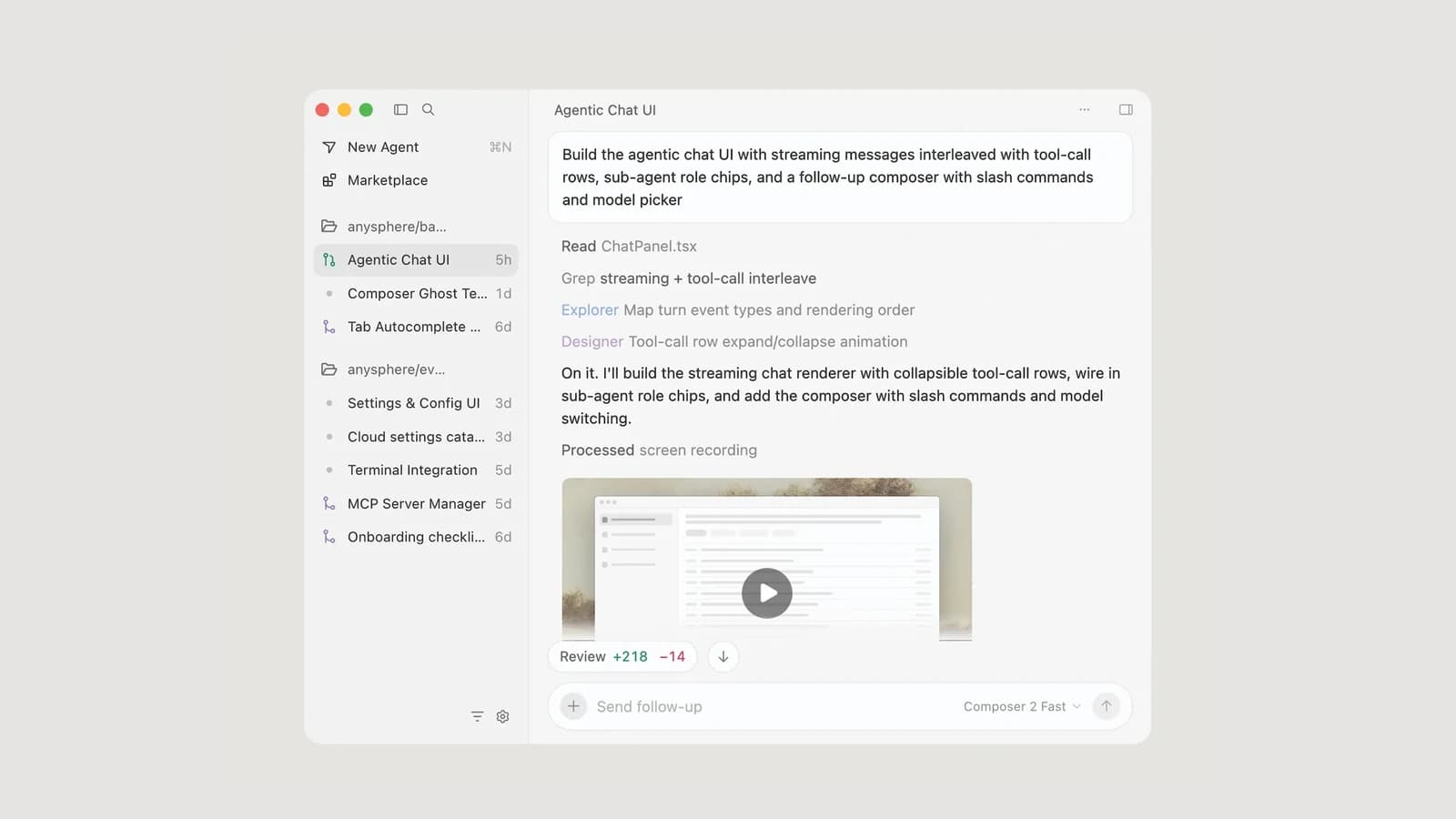
Cursor is an AI code editor and agent workspace built by Anysphere. You write code in an editor that feels familiar to VS Code users, while Tab predicts your next edit, inline edit rewrites a selection on request, and Agent searches the repository, edits files, and runs terminal commands. Since the Cursor 3 release on April 2, 2026, there is also an Agents Window for running and reviewing several agents at once, on your machine or in the cloud.
This tutorial was checked against Cursor's documentation, pricing page, terms, and changelog on September 24, 2026, when the download page listed version 3.21. It is written for developers and engineering leads who want a working setup and a review habit, not a feature tour. One ownership fact matters for planning: Cursor announced on August 14, 2026 that it is now part of SpaceX, and its included model pool now centers on Grok models trained jointly with SpaceXAI.
If you are reading from Iran, start with the availability section below. Cursor's own terms exclude use there, and the rest of this guide assumes you are somewhere Cursor is offered.
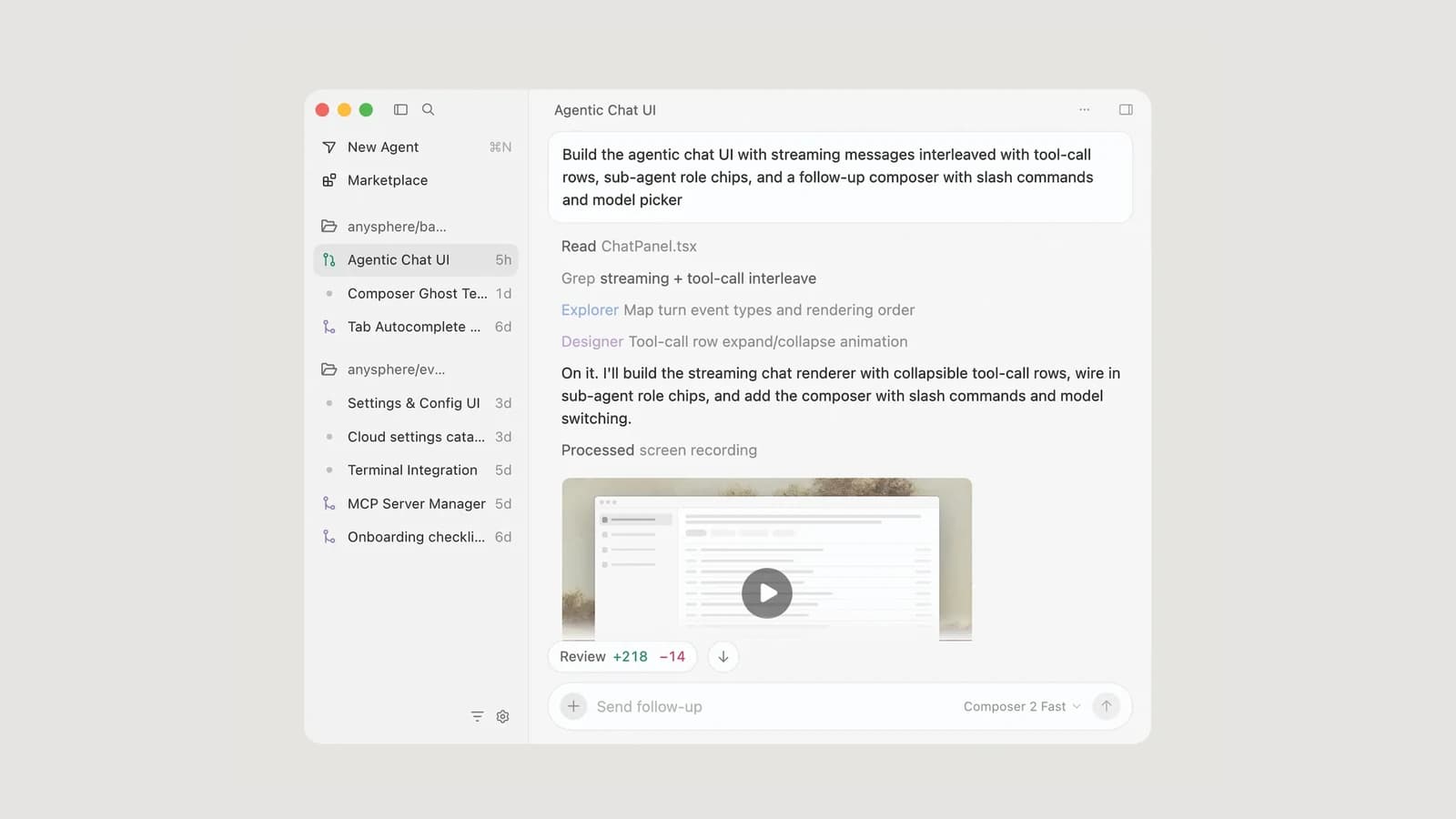 Official Cursor image of the Cursor 3 Agents Window, published with the Cursor 3 announcement
Official product image from Cursor's Cursor 3 announcement.
What Cursor is in September 2026
Cursor is no longer only an editor with a chat panel. It is a family of connected surfaces that share your account, rules, and model settings:
- The editor (IDE): the classic window with Tab, inline edit, and the Agent side panel.
- The Agents Window: an agent-first workspace for parallel local and cloud agents, a diffs view, and handoff between local and cloud work.
- The CLI: a terminal agent installed as the
agent command, with interactive and print modes for scripts.
- Cloud agents: agents that run on remote machines and keep working after you close your laptop.
The Agents Window documentation says both interfaces will keep being supported, and you can switch between them from the command palette. On September 10, 2026 Cursor added Projects, a beta feature in which a coordinator agent plans a large body of work and delegates it to other agents that run in the cloud by default.
A practical reading of all this: learn the editor first. The Agents Window, Projects, and cloud agents multiply whatever review habit you already have, good or bad.
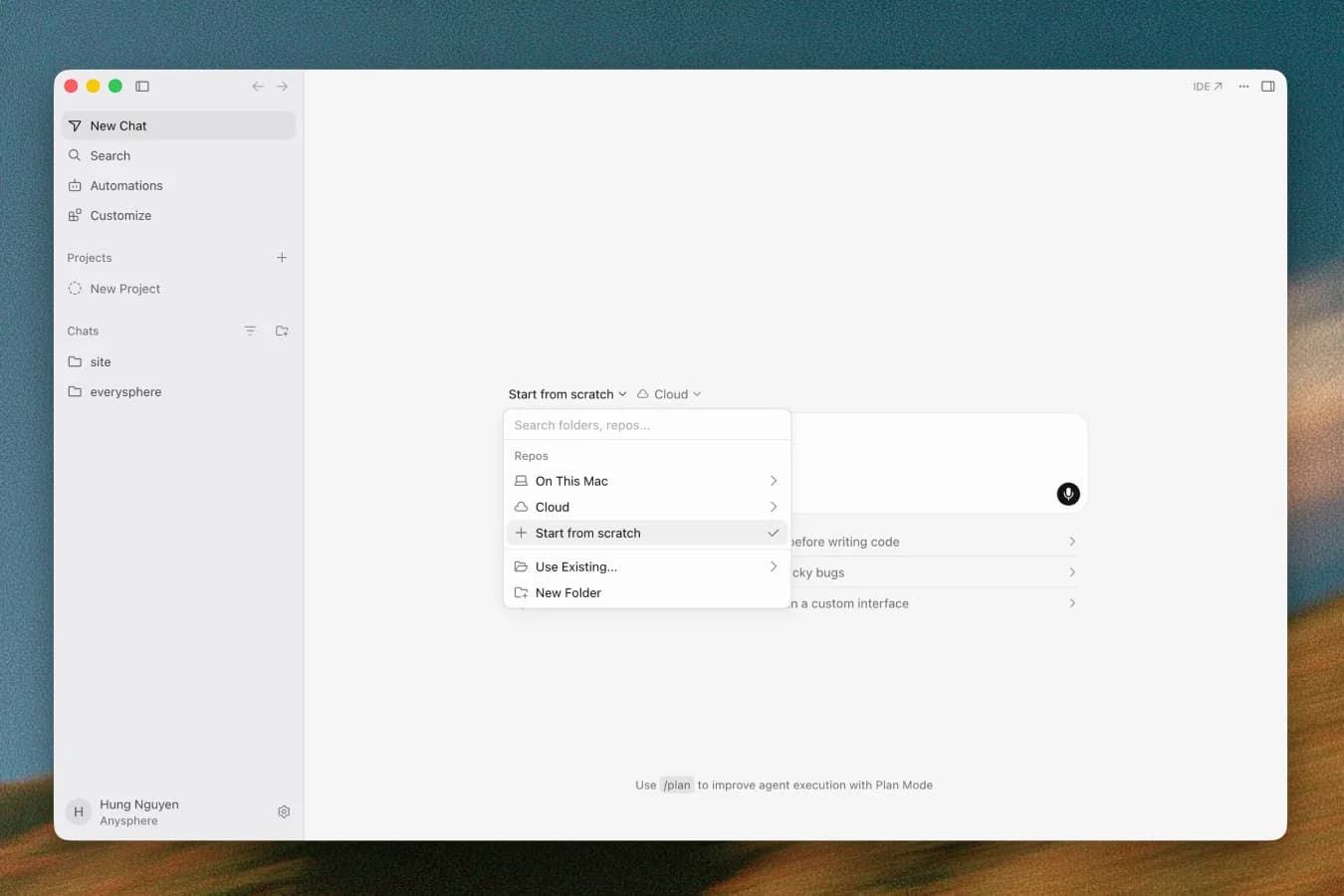 Official Cursor changelog image of the Agents Window start screen with local, cloud, and start-from-scratch options
Official image from the Cursor changelog, August 27, 2026 entry.
Availability in Iran: read this before installing
This section states facts and their sources. It is not legal advice.
- Cursor's terms exclude embargoed countries. Section 17.5 of the Cursor Terms of Service, last updated September 3, 2026, says the service may not be used in or for the benefit of any U.S. embargoed country or territory. The contracting party is Anysphere, Inc.
- Iran is under comprehensive U.S. sanctions. The U.S. Treasury's OFAC Iran sanctions program is administered mainly under the Iranian Transactions and Sanctions Regulations (31 CFR Part 560).
- The restriction applies to every plan. The terms govern the service itself, so the free Hobby plan is covered as much as a paid one.
- Cursor sells only through its own site. The pricing page says subscriptions are sold only through cursor.com, that Cursor authorizes no resellers, and that accounts bought elsewhere may be suspended or terminated at any time. Self-serve plans are paid by credit or debit card.
- Your own API key does not change the picture. Cursor's API key documentation explains that every request is routed through Cursor's servers for final prompt building, even with your own key. The regions page adds that model availability also depends on each provider's own regional policy.
In practice, Cursor is not an available tool for developers or companies inside Iran, and buying a shared or resold account puts both your code and your access at risk. If your aim is AI-assisted coding under your own control, the legitimate path is an open-source agent paired with open-weight models that you run yourself. Our OpenCode tutorial and Qwen Code tutorial cover two open-source harnesses that can connect to OpenAI-compatible model servers you host yourself, such as Ollama or vLLM. For a company, the same idea scales into an internal coding assistant on hardware you manage. Iranian developers who live and work in a country where Cursor is offered can follow the rest of this guide, as long as the work is not for the benefit of an embargoed country, which the same clause also prohibits.
Install Cursor on macOS, Windows, and Linux
The Cursor quickstart lists the current requirements: macOS 12 (Monterey) or later on Apple Silicon or Intel, Windows 10 or later, and Linux through a package repository or a portable AppImage. Download from cursor.com/download, open the installer, and sign in when the app starts.
On macOS, drag Cursor into Applications. On Debian or Ubuntu, Cursor recommends its apt repository because it gives you a desktop entry, automatic updates, and the command-line tools:
curl -fsSL https://downloads.cursor.com/keys/anysphere.asc | gpg --dearmor | sudo tee /etc/apt/keyrings/cursor.gpg > /dev/null
echo "deb [arch=amd64,arm64 signed-by=/etc/apt/keyrings/cursor.gpg] https://downloads.cursor.com/aptrepo stable main" | sudo tee /etc/apt/sources.list.d/cursor.list > /dev/null
sudo apt update
sudo apt install cursor
On Fedora or RHEL, add the yum repository described in the quickstart and run sudo dnf install cursor. The AppImage is portable, but Cursor prefers the packages because they add desktop icons, automatic updates, and the CLI tools.
If you come from VS Code, the migration guide imports your extensions, themes, settings, and keybindings from Cursor Settings > General > Account > VS Code Import. One difference is easy to miss: Cursor installs extensions from the Open VSX registry, not the VS Code Marketplace, so a few extensions may be missing or behave differently.
To update, open the command palette and run Cursor: Attempt Update. The install troubleshooting page explains the Stable and Early Access channels; stay on Stable for team machines.
Installing Cursor on Windows
Windows deserves its own checklist because most setup problems appear there first.
- Pick the right build. The download page offers x64 and ARM64 installers, each as a User or System build. As with VS Code, the User build installs for your Windows account and the System build installs machine-wide. Choose ARM64 on Snapdragon laptops, and on a managed laptop ask IT which build its policy allows.
- Use Ctrl where macOS uses Cmd. Agent is Ctrl+I, inline edit is Ctrl+K, Cursor Settings is Ctrl+Shift+J, and the command palette is Ctrl+Shift+P.
- Choose the shell Agent will use. Agent runs terminal commands in the first available terminal profile. Run Terminal: Select Default Profile and pick the shell your project's scripts expect: PowerShell, Git Bash, or a WSL distribution.
- Install the CLI if you want it. The CLI installation guide gives a native PowerShell command,
irm 'https://cursor.com/install?win32=true' | iex, and the standard curl https://cursor.com/install -fsS | bash inside WSL. Check it with agent --version. The command is agent, not cursor.
- Set up worktrees for Windows. If you run parallel agents,
.cursor/worktrees.json accepts a setup-worktree-windows key that points to a PowerShell script, so each isolated checkout installs dependencies correctly.
- Do not assume a sandbox. The Run Modes page documents how the terminal sandbox works on macOS (Seatbelt) and Linux (Landlock and seccomp). Before you relax approvals on native Windows, confirm in Settings > Agents > Approvals & Execution what your version actually supports.
If the window opens blank, Cursor's troubleshooting page suggests running it as administrator and running Clear Editor History from the command palette. If AI features fail behind a corporate proxy, the network guide recommends Cursor Settings > Network > HTTP Compatibility Mode > HTTP/1.1, because some proxies block the HTTP/2 streams Cursor uses. On company laptops, antivirus or EDR software is a common cause of the "Agent Execution Timed Out" error; export the logs and ask IT for the documented process exclusions.
Your first project in Cursor
Start with a small repository and a clean Git state, so every change Cursor makes is visible in git diff.
-
Open the folder with File > Open Folder.
-
Open the Agent panel with Cmd+I (Ctrl+I on Windows and Linux), press Shift+Tab until Ask mode is selected, and ask for orientation:
Explain this codebase. Point me to the main entry points, key modules,
and anything I should read before making changes. Do not edit files.
-
Switch back to Agent mode and ask for options rather than action: "Suggest three small, safe improvements, explain the trade-offs, and wait for me to choose one."
-
Pick one, let Agent implement it, then read the diff and ask it to run the checks your project already uses: tests, type checks, lint, or a local build.
Ask mode is read-only, which makes it the right mode for unfamiliar code. Cursor's agent troubleshooting page also recommends starting a new chat when you finish a feature or switch tasks; long mixed conversations are a common reason for drifting answers.
Tab: the autocomplete that predicts your next edit
Tab suggests code as you type, using your recent edits, the surrounding code, and linter errors. Press Tab to accept, Escape to reject, or Cmd+Right (Ctrl+Right) to accept one word at a time. Suggestions can span several lines, add missing imports, and coordinate related edits.
After you accept a suggestion, pressing Tab again jumps to the place Cursor predicts you will edit next. When the next edit belongs in another file, a small portal appears at the bottom of the editor. You can snooze Tab or turn it off for specific file types from the Tab indicator in the status bar, which is useful in Markdown or large JSON files.
Two boundaries are worth knowing. Rules do not affect Tab, and Tab keeps using Cursor's own models even if you add your own API key.
Inline edit with Cmd+K or Ctrl+K
Inline edit is for a targeted change you can describe in one sentence. Select code, press Cmd+K (Ctrl+K), type an instruction such as "convert this to an async function with a timeout," and press Return. Add follow-up instructions to refine it.
Press Opt+Return (Alt+Return) inside the prompt to ask a question about the selection instead of editing it. If the change turns out to touch several files, press Cmd+L (Ctrl+L) to move the selection into Agent. Note that User Rules are not applied to inline edit, so put conventions that matter into project rules and review the result against them.
Agent, Ask, and Plan modes
The Agent documentation describes an agent built from three parts: instructions (system prompt and rules), tools (search, file reads and edits, terminal, web, browser), and the model you choose. There is no fixed limit on tool calls in a task, which is why scope matters.
Press Shift+Tab to rotate between modes:
- Agent edits files and runs commands.
- Ask explores and answers without editing.
- Plan researches the codebase, asks clarifying questions, writes an implementation plan, and waits for approval before building.
Plan Mode saves plans in your home directory by default; choose Save to workspace when a plan should be reviewed with the team. When a build goes wrong, Cursor's own advice is to revert, sharpen the plan, and run it again rather than patching an off-track agent with follow-ups.
Agent edits are written to disk immediately, while configuration files and, by default, terminal commands need approval. Checkpoints let you restore files to an earlier point in the chat, but they are local and separate from Git, so commit before any large change.
While Agent is working, Enter queues your next message and Cmd+Enter (Ctrl+Enter) sends it immediately. The /goal command, still rolling out, gives Agent a long-lived objective such as making CI green.
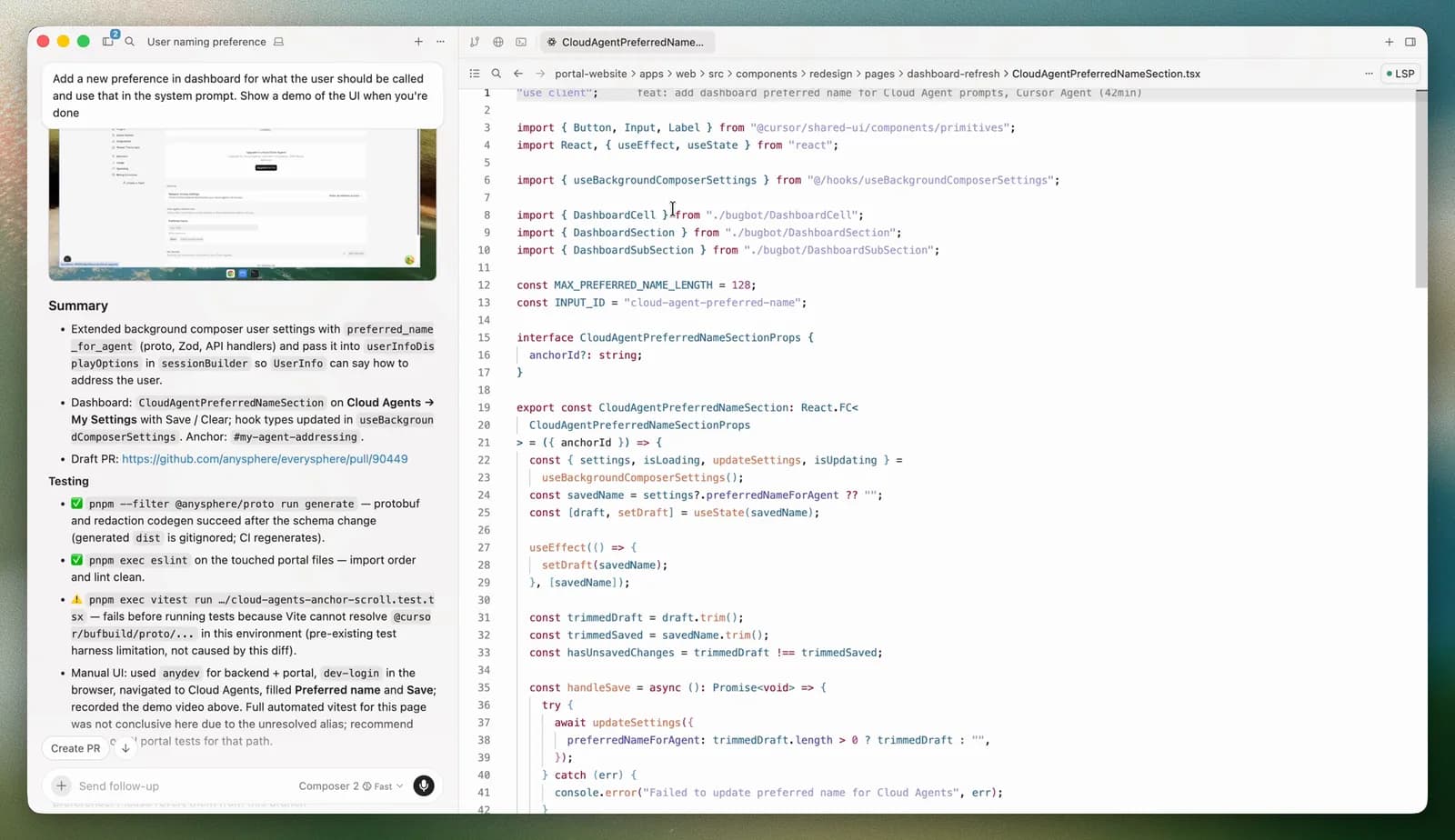 Official Cursor documentation screenshot of an agent summary, test results, and the edited file side by side
Official screenshot from Cursor's Agents Window documentation. Read the summary, then verify it against the diff and test output.
Rules and AGENTS.md: give Cursor a project contract
Rules are persistent instructions placed at the start of the model context. Cursor supports four kinds:
- Project Rules in
.cursor/rules/, version-controlled with the code;
- User Rules, global preferences in Customize > Rules;
- Team Rules, managed from the dashboard on Teams and Enterprise;
- AGENTS.md, plain Markdown in the project root or any subdirectory.
A project rule must use the .mdc extension. A plain .md file inside .cursor/rules is ignored because it has no frontmatter. The frontmatter decides when a rule loads:
| Setting | When the rule is included |
|---|
alwaysApply: true | Every chat session |
globs set, alwaysApply: false | When a matching file is in context |
description set, no globs | When Agent judges the description relevant |
| None of the above | Only when you @-mention the rule |
A focused rule for API code might look like this:
---
description: Conventions for HTTP handlers in services/api
globs: services/api/**/*.ts
alwaysApply: false
---

- Validate request bodies with the shared zod schemas before any database call.
- Return errors as { code, message }; never throw raw strings to the client.
- After editing a handler, run the nearest test file and report the result.
When guidance conflicts, Team Rules win over Project Rules, which win over User Rules. Keep each rule under 500 lines, point to example files instead of pasting code, and add a rule only after you see Agent repeat the same mistake. The /create-rule command drafts one for you.
Context and @-mentions
Agent searches the codebase on its own, but you get better results when you point at what matters. Type @ in the chat input to attach context:
- files and folders, such as
@auth.ts or @src/components/;
@Terminals for terminal output;@Chats for a previous conversation;@Commit (Diff of Working State) for uncommitted changes, or @Branch (Diff with Main) for the whole branch;@Browser for context from the built-in browser.
Use .cursorignore to keep build output, vendored code, and secrets out of AI context. The ignore-files page says Cursor already ignores .env files, .git/, and lock files, and respects .gitignore. It also states the limit clearly: ignored files are blocked from Agent, but terminal commands and MCP tools run outside Cursor's file controls and may still read them. Treat .cursorignore as noise reduction, not as a secret store.
Connect MCP servers carefully
The Model Context Protocol lets Cursor call external tools and data sources. The Cursor MCP documentation supports stdio, SSE, and Streamable HTTP transports, configured in .cursor/mcp.json for one project or ~/.cursor/mcp.json for every project. Keep secrets out of the file with environment interpolation:
{
  "mcpServers": {
    "issue-tracker": {
      "command": "npx",
      "args": ["-y", "example-issue-tracker-mcp"],
      "env": {
        "TRACKER_TOKEN": "${env:TRACKER_TOKEN}"
      }
    }
  }
}
By default, Cursor asks before it connects an MCP server and again before each tool call, and you can expand the call to read its arguments. MCP tools follow the same Run Modes as terminal commands. Cursor's own security checklist is short and sound: install servers only from trusted sources, check what data they reach, use restricted API keys, and read the source for critical integrations. If a server misbehaves, open the Output panel and choose MCP Logs.
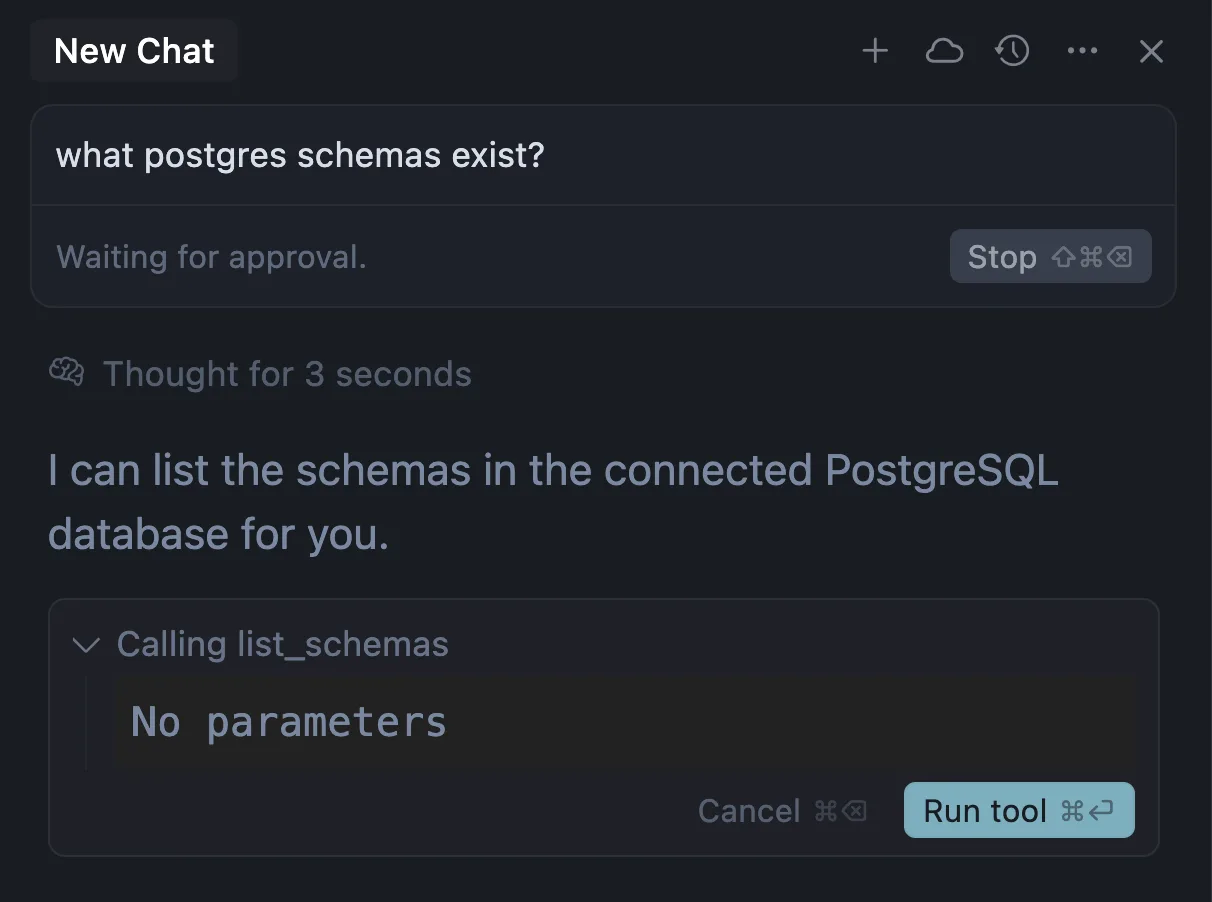 Official Cursor documentation screenshot of an MCP tool call waiting for approval
Official screenshot from Cursor's MCP documentation: the tool call waits until you approve it.
For trust boundaries between agents and tools, see our guide to MCP integration architecture.
Run modes, sandboxing, and approvals
Open Settings > Agents > Approvals & Execution to choose how much Agent may run without asking:
| Run Mode | What runs without asking | Good fit |
|---|
| Auto-review | Allowlisted calls; other shell commands in the sandbox when possible; everything else is checked by a classifier | Daily work with fewer prompts |
| Allowlist | Only actions on your allowlist | Predictable, repeatable setups |
| Run Everything | Every tool call | Disposable environments only |
Cursor's documentation is explicit that Auto-review "is not a security boundary": the classifier can allow something you would have blocked. You can steer it with plain-English instructions in permissions.json, either in ~/.cursor/ or in the project's .cursor/ folder:
{
  "autoRun": {
    "allow_instructions": [],
    "block_instructions": [
      "Every command that touches production databases should go through approval first.",
      "Every git push should go through approval first."
    ]
  }
}
The sandbox is configured separately in sandbox.json. Inside it, a command can work in the workspace but cannot freely write outside approved paths or reach arbitrary network destinations, and paths such as .git/hooks stay protected. The Agent security page adds that workspace trust is off by default and that untrusted repositories are better opened in a plain text editor. Our article on tool permission security explains why approval should be tied to a specific action rather than to general trust in the model.
Models, Auto, and Privacy Mode
According to Models and Pricing, individual paid plans include two monthly usage pools:
- Cursor Models: Grok 4.7, Grok 4.6, Grok 4.5, and Composer 2.5, with much more included usage;
- Other Models: third-party models from OpenAI, Anthropic, Google, and others, charged at each provider's API price.
Auto picks an available model for each request and bills at that model's list price. On Teams and Enterprise, Cursor Router adds Cost, Balance, and Intelligence modes. Press Cmd+/ (Ctrl+/) to cycle models. Cheaper models are fine for exploration; switch to a stronger model for architecture or security-sensitive changes, and keep the same model when you compare results.
You can add your own keys for OpenAI, Anthropic, Google, Azure OpenAI, or AWS Bedrock in Cursor Settings > Models. They work for chat models only, and Cursor's zero data retention commitments do not apply to requests made with your own key.
Privacy Mode guarantees that your code is not used for training by Cursor or its model providers. Turn it on in Cursor Settings (Cmd+Shift+J or Ctrl+Shift+J) under General. It is on by default for team members, and Teams and Enterprise admins can enforce it. Some models require provider-side data retention; they fall outside Cursor's zero data retention agreements and stay off by default until an admin approves them.
Cursor pricing as published on September 24, 2026
These are vendor prices from Cursor's pricing page and pricing help, before tax. They change often, so confirm them before you budget.
| Plan | Price | What stands out |
|---|
| Hobby | Free | No credit card; limited Agent requests; access to Composer |
| Pro | $20 per month | Extended Agent limits, frontier models, MCP, skills, hooks, cloud agents |
| Pro+ | $60 per month | Recommended by Cursor for daily agent users |
| Ultra | $200 per month | Recommended by Cursor for agent power users |
| Teams Standard | $40 per user per month | Central billing, a team marketplace for rules, skills, and plugins, Bugbot, analytics, enforced Privacy Mode, SSO |
| Teams Premium | $120 per user per month | Five times the Standard Agent limits |
| Enterprise | Custom | Pooled usage, invoicing, SCIM, model and MCP access controls, audit logs |
Cursor also sells a Start plan only in India for ₹649 per month. When included usage runs out, you can enable on-demand usage billed in arrears at the same API rates, or upgrade. Cursor's own estimate is that daily Agent users typically spend $60 to $100 a month in total usage, and power users running several agents often exceed $200. On Teams and Enterprise, third-party model requests also carry a Cursor Token Rate of $0.25 per million tokens, including requests made with your own key.
Using Cursor in a team
Individual habits do not scale on their own. A team rollout needs shared configuration, clear permissions, and a way to measure whether the tool helps.
Commit the files that encode team policy: .cursor/rules/, AGENTS.md, .cursor/mcp.json with environment variables instead of secrets, .cursor/permissions.json, and .cursor/worktrees.json. Use Team Rules for standards every repository must follow, and mark the critical ones as enforced so members cannot switch them off.
For parallel work, worktrees give each agent its own Git checkout, so two agents do not overwrite each other. Appoint one person to integrate and review. Cloud agents and Projects move execution off the developer's machine, so decide which repositories may leave local machines at all; since September 2, 2026 Cursor also lets teams run cloud agents on machines they manage.
Measure outcomes that matter: accepted diffs, review time, reverted changes, incidents, and spend per engineer. If you want help designing that rollout, governance, and evaluation, our AI consulting service works on exactly this kind of adoption plan.
Common failure modes and fixes
- A rule is ignored. Check the extension (
.mdc, not .md), that an intelligent rule has a description, and that globs match the files in context.
- Agent cannot see a file. Check
.cursorignore and .gitignore, run Reindex from the command palette, or attach the file with @.
- Commands behave differently under Agent. Cursor sets
CI=1 for Agent's terminal commands; unset it in the command or a rule if your tools change behavior.
- AI features fail behind a proxy. Switch HTTP Compatibility Mode to HTTP/1.1 and restart.
- "Agent Execution Timed Out." Export the Main, Window, and Extension Host logs, and check endpoint security software on managed machines.
- A model disappears from the picker. Provider regional rules or team model controls may have hidden it; use Auto or another enabled model.
- An extension is missing. Cursor installs from Open VSX, so look for an equivalent extension published there.
- Agent rewrote too much. Restore a checkpoint, then return to Plan Mode with a tighter scope. Git remains your durable undo.
- A secret appeared in a transcript. Rotate it.
.cursorignore does not stop terminal commands or MCP tools from reading files.
Cursor vs Claude Code vs Codex
All three can read a repository, edit files, and run commands. The difference is where you spend your day.
| Cursor | Claude Code | OpenAI Codex |
|---|
| Home surface | Editor, plus Agents Window and CLI | Terminal first, plus IDE, desktop, and web | CLI, desktop, IDE extension, and cloud |
| Best at | Tab, inline edit, and visual diff review | Deep terminal workflows, hooks, and automation | Delegated tasks with sandboxed execution |
| Project instructions | .cursor/rules and AGENTS.md | CLAUDE.md | AGENTS.md |
| Models | Several vendors plus Cursor's Grok and Composer pool | Anthropic's Claude models | OpenAI models |
Choose Cursor if you want AI inside the editor while you keep typing. Choose Claude Code or Codex if you prefer to hand a terminal agent a task and review the result. Many teams use one editor tool and one terminal agent side by side. Our Claude Code tutorial and Codex tutorial cover setup, permissions, and workflows for the other two, and OpenCode is the open-source option when you need self-hosted models.
A practical Cursor workflow
- Start on a clean branch and confirm
git status is empty.
- Use Ask mode to map the code you are about to change.
- For anything that touches several files, switch to Plan Mode and edit the plan until scope, non-goals, and tests are explicit.
- Attach the right context with
@, including the relevant rule or test file.
- Build with Agent under Allowlist or Auto-review, never Run Everything on a machine with real credentials.
- Read the whole diff, not just the summary, and reject anything outside scope.
- Ask Agent to run the targeted tests and type checks, then run them yourself before you commit.
- Update a rule when you see a repeated mistake, and commit the rule with the code.
Frequently asked questions
Is Cursor AI free?
Yes, there is a free Hobby plan with limited Agent requests and no credit card. Regular Agent use usually needs Pro at $20 a month or higher.
Is Cursor just VS Code with AI?
It feels like VS Code: default shortcuts match, settings import in one click, and extensions come from Open VSX. The difference is the AI layer: Tab, inline edit, Agent, rules, MCP, and the Agents Window.
Can Cursor use local models?
Not as a local-first tool. Your own keys work for OpenAI, Anthropic, Google, Azure OpenAI, and AWS Bedrock chat models, and requests still pass through Cursor's servers. For fully local models, use an open-source agent such as OpenCode or Qwen Code.
Is Privacy Mode enough for confidential code?
Privacy Mode stops training on your code, but your prompts and code context still go to model providers to generate answers. For regulated code, review Cursor's data governance documentation and your own policy before enabling AI features.
Source Notes
This guide was reviewed on September 24, 2026 against Cursor's official documentation, pricing page, terms, blog, and changelog, plus the U.S. Treasury OFAC Iran program page. Prices, plan names, and model lists are vendor statements and change often.
- Product and releases: Cursor 3 announcement, Cursor joins SpaceX, Projects, changelog, and Agents Window
- Installation: download page, quickstart, CLI installation, VS Code migration, install troubleshooting, and network troubleshooting
- Editing features: Tab, inline edit, Agent, Plan Mode, and agent troubleshooting
- Configuration: rules, @-mentions and context, ignore files, MCP, and worktrees
- Security: Agent security and Run Modes
- Models, privacy, and pricing: Models and Pricing, API keys, Privacy and data, regions, and pricing page
- Availability and law: Cursor Terms of Service, section 17.5, and the OFAC Iran sanctions program