If you want to run a coding agent such as Qwen Code or OpenCode on a model whose weights you hold yourself, three families get the most attention today: Qwen3.8 from the Qwen team, GLM-5.2 from Z.ai, and DeepSeek-V4. All three have published weights, but their size, licence and hardware needs differ enormously, from a model that runs on two consumer graphics cards to one that weighs several terabytes. This guide answers one practical question: which one should you run on your own server, and how.
Every size, licence and context length here was read on 28 September 2026 from each model's official Hugging Face card, the official GLM repository, and DeepSeek's official API change log. Since August, all three families have shipped newer releases, namely GLM-5.3 and DeepSeek-V4.1-Flash, and we cover those where they belong.
 Official DeepSeek image
Official image from the DeepSeek API documentation.
A model is not the same as an agent
A language model only produces text and tool-call requests. An agent such as Qwen Code, OpenCode or Hermes Agent decides which files the model sees, which commands it may run, what it must ask permission for, and what gets summarised when a conversation grows long.
That is why the same model can work very well in one agent and poorly in another. The difference usually comes from how the agent defines its tools and system instructions, whether it handles the model's reasoning mode properly, how it manages the context window, and how the model server is configured. So test each model in the same agent your team will actually use.
The short answer: which model on your own server?
If you want one sentence: start with Qwen/Qwen3.8-27B. The details depend on the hardware you have:
- One server with one or two graphics cards:
Qwen/Qwen3.8-27B. A dense model with 27 billion parameters, an Apache 2.0 licence and a 262K-token context window, which also understands images and video. Its Ollama build is about 18 GB, and the official vLLM recipe has verified a compressed build of it on two RTX 5090 cards.
- One powerful server with several data-centre GPUs:
deepseek-ai/DeepSeek-V4-Flash-0731. A model with 284 billion parameters of which only 13 billion are active per token, with a one-million-token context window and an MIT licence. Its weight files come to about 167 GB, and the model card gives its launch command for one node with four GB300 cards.
- A multi-server cluster: GLM-5.2 or GLM-5.3 at 744 billion parameters, or the largest Qwen3.8 model at 2.4 trillion parameters. These suit a team with data-centre infrastructure.
If you have no hardware at all, the alternative is a service that offers one of these models behind an OpenAI-compatible interface; choose one that answers in writing about where and for how long it keeps your data. Whatever you choose, the final decision belongs to a test on your own repository, not to a benchmark table.
Open models compared
This table covers only models whose weights are published for running on your own server. "Active" means the number of parameters used to process each token, and the weight size is the total of the model's files on Hugging Face on the review date.
| Model | Total and active parameters | Licence | Context window | Weight size | Input |
|---|
Qwen/Qwen3.8-27B | 27B, dense | Apache 2.0 | 262K tokens, extensible to about 1M | About 56 GB (FP8 build about 31) | Text, image, video |
Qwen/Qwen3.8-2.4T-A95B | 2.4T, 95B active | Qwen3.8-Max License | 262K tokens, extensible | About 2,500 GB for the FP8 build | Text only |
zai-org/GLM-5.2 | 744B, 40B active | MIT | 1M tokens | About 756 GB for the FP8 build | Text |
deepseek-ai/DeepSeek-V4-Flash-0731 | 284B, 13B active | MIT | 1M tokens | About 167 GB | Text |
deepseek-ai/DeepSeek-V4.1-Flash | 552B, 8B active while reading input and 16B while generating | MIT | 1M tokens | About 510 GB | Text, image |
We left benchmark numbers out of the table on purpose. Each vendor measured its model with a different agent and different settings, so those numbers cannot be put side by side.
Qwen3.8: from 27 billion to 2.4 trillion parameters
Since August 2026 the Qwen team has published several Qwen3.8 models on Hugging Face and describes the generation as the most capable in the Qwen open-model family to date. According to the official Qwen3.8-27B card, the model runs with reasoning on by default, and reasoning depth is set with the reasoning_effort parameter at three levels: xhigh (the default), medium and low. For reasoning mode the card recommends these sampling settings: temperature=1.0, top_p=0.95 and top_k=20. It also warns that in multi-step agent work, lowering the reasoning level does not always finish the task sooner, because it can lead to more retries.
For commercial use, look at the licence of each family member separately:
Qwen/Qwen3.8-27B is released under Apache 2.0 and has no special limits on commercial use.Qwen/Qwen3.8-2.4T-A95B has its own licence, called Qwen3.8-Max. If your company sells a model-serving service or an AI assistant for coding and office work, and its revenue over 12 months exceeds 50 million US dollars, it needs a separate licence. This model accepts text only, and its reasoning mode cannot be turned off.Qwen/Qwen3.8-Flash-Next is an experimental preview of the next-generation architecture: 125 billion parameters with 6 billion active, plus 51 billion embedding parameters. Its licence, Qwen Community License 1.0, is stricter: a company that runs a model-serving service or an AI assistant for coding and office work needs a separate licence for any commercial use, unless the use is purely internal and neither the model nor its output is made available to any third party.
If you plan to build a product on Qwen models and sell it to customers, these licence differences matter more than a few points of benchmark difference.
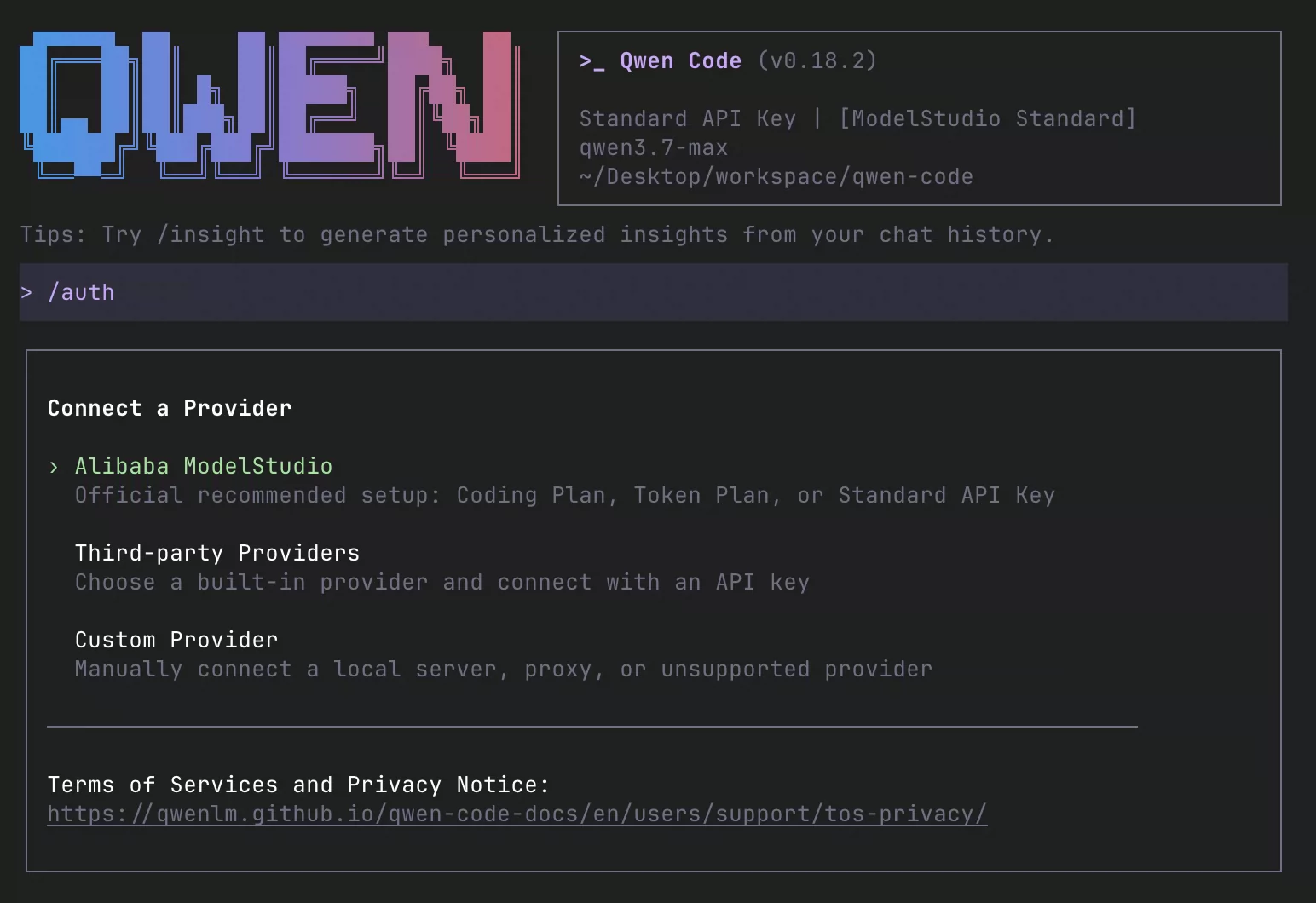
 Official Qwen Code documentation image
Official image from the Qwen Code documentation.
GLM-5.2 and GLM-5.3
Z.ai introduced GLM-5.2 on 16 June 2026, and its official GLM-5.2 announcement calls it the company's flagship for long, multi-step tasks. According to the official GLM-5.2 card, the model has a stable one-million-token context window, supports several effort levels for coding, and is released under the MIT licence. The model table in the official GLM repository lists its size as 744 billion parameters with 40 billion active. For serving, the card lists SGLang from version 0.5.13.post1, vLLM from version 0.23.0, and KTransformers.
GLM-5.3 followed in late August 2026. According to its maker, it uses the same base model as GLM-5.2 and all of its gains come from post-training; Z.ai says it scored 50 percent higher than GLM-5.2 on its own internal coding benchmark. GLM-5.3's licence is no longer plain MIT: a company that runs a model-serving business with revenue above 10 billion US dollars over 12 months must pass Z.ai's security review before commercial use. For almost every company this condition does not apply in practice. A lighter GLM-5.3-Flash has also been released, with 320 billion parameters, 18 billion active, and an MIT licence.
One point for Ollama users: the GLM-5.2 page on Ollama only has the glm-5.2:cloud tag, which means the model runs on Ollama's servers, not yours. That route does not count as running the model on your own server.
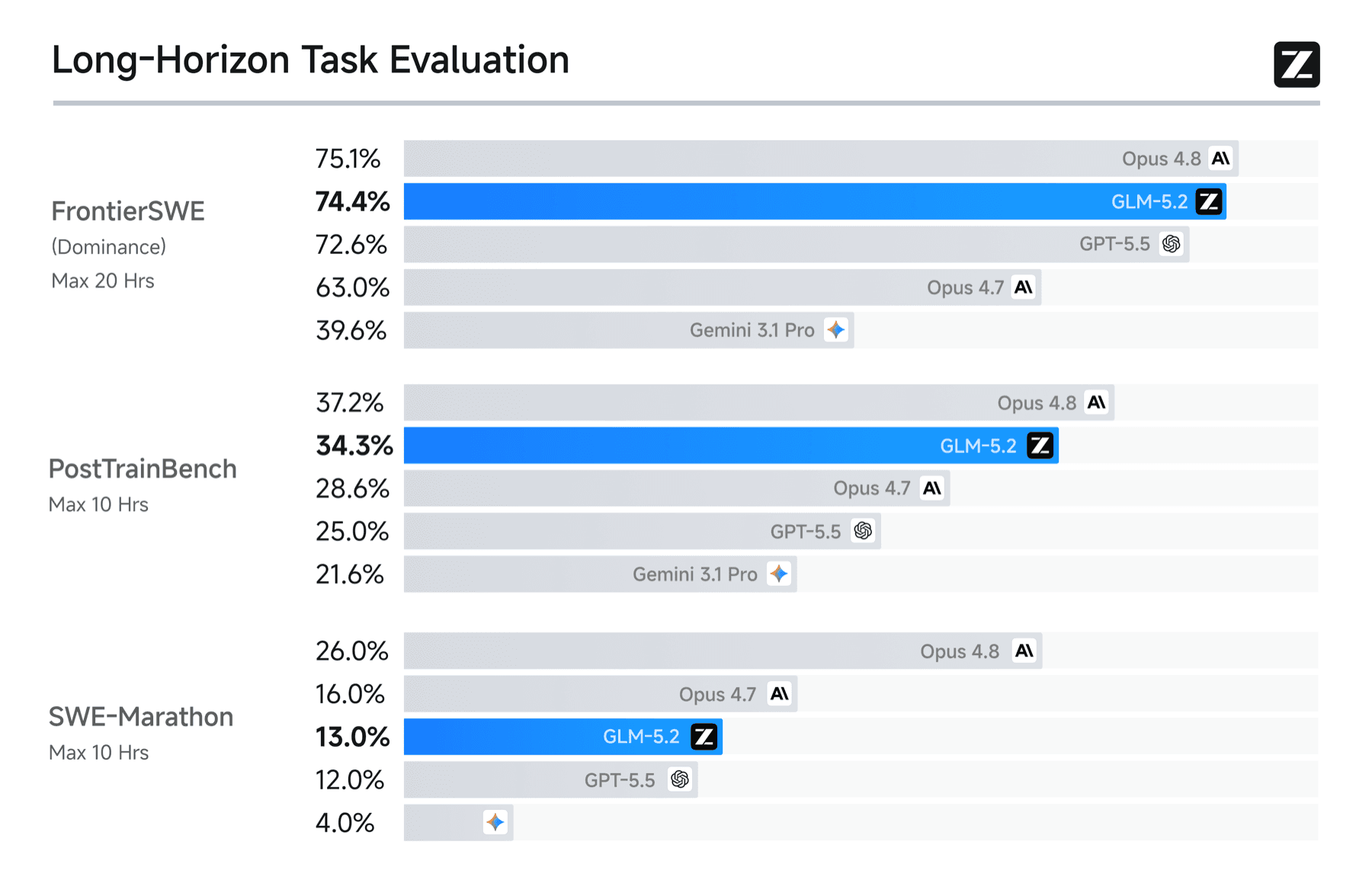 Official GLM-5.2 long-horizon chart
Official Z.ai chart from the GLM-5.2 launch. The numbers are reported by the vendor and do not guarantee results on your repository.
DeepSeek-V4 and DeepSeek-V4.1-Flash
DeepSeek published a preview of the V4 family in April 2026: V4-Pro with 1.6 trillion parameters and V4-Flash with 284 billion, both with a one-million-token context window and an MIT licence. According to the official DeepSeek-V4-Flash-0731 card, this is the official release of V4-Flash and replaces the preview; DeepSeek says it beats even the V4-Pro preview on its own listed benchmarks. This release ships no ready-made Jinja chat template; instead it provides message-encoding scripts in an encoding folder, so rely on the vLLM recipe to serve it. The example the card itself gives for one node with four GB300 cards is:
# From the DeepSeek-V4-Flash-0731 model card: one node with 4x GB300
vllm serve deepseek-ai/DeepSeek-V4-Flash-0731 \
  --trust-remote-code --kv-cache-dtype fp8 --block-size 256 \
  --data-parallel-size 4 --enable-expert-parallel \
  --moe-backend deep_gemm_mega_moe \
  --attention-config '{"use_fp4_indexer_cache": true}' \
  --speculative-config '{"method":"dspark","num_speculative_tokens":7,"draft_sample_method":"greedy"}'
On 10 September 2026, DeepSeek-V4.1-Flash was released. Its architecture is new: it has 552 billion backbone parameters, activates 8 billion while reading input and 16 billion while generating, understands images natively, and again carries an MIT licence. Its reasoning level is a number from 1 to 100 rather than a few fixed options. Its weights come to about 510 GB, so it needs more hardware than V4-Flash-0731. We covered it in more depth in our DeepSeek-V4.1-Flash article.
If you have also used DeepSeek's API, watch the model names. According to DeepSeek's API change log, the new name is deepseek-flash, and deepseek-v4-flash is only routed to V4.1-Flash temporarily. The deepseek-v4-flash page on Ollama also states that the model was retired on 25 September 2026.
How to run the model on your own server
There are two main routes, and both end with an OpenAI-compatible interface for the agent.
Ollama, to start and test on one server. According to the Qwen3.8 page on Ollama, one command is enough:
ollama run qwen3.8
The OpenAI-compatible interface is then at http://localhost:11434/v1. This route suits testing and use by one or a few people.
vLLM, for a team. When several people use the model at the same time, vLLM or SGLang is the better choice. The official vLLM recipe for Qwen3.8-27B verified this command on two RTX 5090 cards with the full 262K-token window. The weights in this example are a compressed build made by Unsloth, about 23 GB:
# Verified in the vLLM recipe on 2x RTX 5090 (tensor parallel across two cards)
vllm serve unsloth/Qwen3.8-27B-NVFP4 \
  --tensor-parallel-size 2 \
  --max-model-len 262144 \
  --kv-cache-dtype fp8 \
  --reasoning-parser qwen3 \
  --enable-auto-tool-choice --tool-call-parser qwen3_xml
The last two flags turn on tool calling; without them a coding agent cannot read files or run commands. The same recipe says that on a single RTX 5090 it only fits with a 32K-token window and the --enforce-eager flag. vLLM normally listens on port 8000, so the agent connects to http://<server>:8000/v1.
Connecting the agent. For Qwen Code, define the model under modelProviders with the openai type; according to the Qwen Code model providers page, the id must be the name the model server uses. In the example above that name is unsloth/Qwen3.8-27B-NVFP4. The full settings file, with an explanation of each part, is in our Qwen Code tutorial.
Your own server or a hosted API?
When the model runs on your own server, your code and data never leave the organisation's network, you decide the exact model version and when it changes, and with steady heavy use you pay for hardware rather than for every token. Before commercial use, review the licence text of the exact version you downloaded with a legal adviser; as you have seen, members of the same family can carry different licences.
The hosted services of the same vendors, meaning Qwen's cloud service, the Z.ai API platform and the DeepSeek API, are the quickest way to try a model, but your code is sent to their servers and their own terms and data retention policies apply. Read those before you connect a real repository. Ollama's cloud tags also run the model on Ollama's servers and are not a substitute for self-hosting.
A fair test on your own repository
Instead of a single test question, pick a few real tasks from your own repository and measure each model on the same ones:
- Understanding code: explain one request's path from entry point to database, naming the files and editing nothing.
- Fixing a bug: reproduce a known defect, write a test for it, and make the smallest fix.
- Review: find a problem you planted on purpose in a prepared change.
- A long task: finish a multi-step rewrite within a fixed time and token budget.
- Resuming after an interruption: carry on correctly after a tool error or a summarised conversation.
To keep the comparison fair, hold these the same for every model: the repository and agent versions, the project instruction file, the permission mode, the reasoning level, the context length on the server, and the time and turn limits. Run each test more than once, because agent results vary from run to run. Write down what you will measure in advance too: the share of tasks accepted without changes, the number of reviewer corrections, files changed for no reason, total time and token use.
Common mistakes in choosing and running a model
Treating open weights as a free licence: being able to download a model's weights does not make it free for every commercial use. Read each version's licence separately.
Running the server without tool calling: if you start vLLM without the tool-calling flags, the model answers plain chat well, but the agent cannot work with it.
Trusting the context-window number: support for one million tokens is the ceiling, not a promise that it fits on your hardware or that sending the whole repository with every request improves results. Set the window to match your GPU memory.
Pulling a cloud tag instead of a local model: in Ollama, cloud tags run on Ollama's servers. If the goal is self-hosting, only pull tags that have a size and a downloadable file.
Accepting the vendor's benchmark instead of your own test: the numbers on a model card are useful for shortening the list of candidates, but readiness for your team is decided by a test on your own repository.
Rolling out an open model for a development team
Choosing the model is only half the job. Before a coding agent backed by your own model goes to the team, make these decisions:
- Model licence: record the exact model version and its licence text, and make sure it fits how your organisation will use it;
- Server capacity: estimate the number of simultaneous users and the context length you need, and choose hardware on that basis;
- One address for the model: put the model server behind an internal interface with authentication and request logging, so changing the model is only a settings change;
- Shared instructions and permissions: one
QWEN.md or AGENTS.md in git and the same permission rules for everyone;
- Review rule: no change merges without human review;
- A monthly cost cap in toman: count server rent or depreciation, power and maintenance, and compare that with the cost of a hosted API;
- Before and after: measure the time and quality of a few recurring team tasks before and after the rollout.
If you want to choose the right model for your organisation's development team, set it up on your own server, and connect it to agents such as Qwen Code with clear access and review rules, talk to us: call +98 901 555 5651 or message us on WhatsApp. You can also read about the service on the local AI on your own servers page.
Source Notes (reviewed 2026-09-28)
The sizes, licences, context lengths and commands in this guide were checked on that date against these official pages. Weight sizes were totalled from each model's file list on Hugging Face on the same day.